Monday, 8 July 2019

IDOLCHAMP Tutorial (Vote for BEST ARTIST in first half of 2019!)

Hi everyone, it's me StayWithYouL (please find me on Twitter if you've got any questions: https://twitter.com/StayWithYouL) again. (ノ≧∀≦)ノ I have received some requests regarding this ongoing voting on IDOLCHAMP (Vote for BEST ARTIST in first half of 2019!). 

Important: 
Voting period is from 8th July 2019 to 19th July 2019 (6PM KST)

Why should we vote and what are the benefits?

  • 1st place will get a big ad located at Samsung Station (main point)
  • Period of the ad will be from 1st August to 30th August 2019 (1 whole month of promotion for INFINITE if we managed to get them the No.1 spot)

Here are some rules you guys should take note, before I begin with the voting tutorial:
  1. There are total of 15 idol groups on the list, hence please be mindful with whoever you're sharing your answers with. Strictly INSPIRITS ONLY.
  2. There are some changes to IDOLCHAMP voting, for more information, please click onto "Notice". It is no long just red hearts, the ongoing voting requires both red & blue hearts.
  3. Please DO NOT anyhow use those hearts that you have earned, as this voting require 1 vote = 20 red/blue hearts (if you don't have enough red hearts, they will deduct your blue hearts. It works either way.)
  4. Quizzes cannot be re-do, 1 device 1 time only. However, you can use multiple accounts to watch the videos to earn hearts
  5. I'll be sharing out answers to the quizzes through a link (why? i'll check if you're an inspirits before sharing. Hence, do not tell me things like "i don't tweet about infinite, doesn't mean i'm not their fans? Well, you don't even follow their official / any members accounts..? Sorry, I'll just simply ignore such DMs)

How to vote on IDOLCHAMP, here we go! ୧༼✿ ͡◕ д ◕͡ ༽୨

Step 1:
Download "IDOLCHAMP" from your App Store

Step 2:
You can login by Facebook / Gmail / Kakao Accounts


Step 3:
After you have login in, you have to set up your account: 
1. Go to "≡" , then click onto the DP icon
2. "My profile" will pop out, then click onto "Profile Setting"
3. Set your DP and Username


ok, now your account is set up! Good job ╰(✧∇✧╰)

Step 4:
How to earn hearts?
2 type of hearts can be earned for voting:
  • Red hearts, earned through:
    ⇨ Daily login = 20 Red hearts (Easiest way you can earn Red hearts)
    ⇨ Like it for comments: Once a day, 30 Red hearts for more than 20 like it (this requires teamwork among us)
    ⇨ Like it for community posts: Once a day, 30 Red hearts for more than 30 like it (this requires teamwork among us)
    ⇨ Free charging station: 3 Red hearts earned by watching 1 each (limited)
  • Blue hearts
    ⇨ Write comments: 20 Blue hearts, once a day
    ⇨ Write community posts: 30 Blue hearts, once a day
    ⇨ Solve quizzes (I'll provide you the answers via DM on Twitter) 

Where is Free charging station?
1. Go to "≡" 
2. Click onto "Free Chamsim Charging"
3. Click onto "video ad" (1 video = 3 Red hearts, and it's limited)


Where are the quizzes located at?
1. Look for the pencil icon below your screen
2. click onto "Start" to answer the quizzes

Step 5:
Where to vote for IDOLCHAMP (Vote for BEST ARTIST in first half of 2019!)?
1. Look for the "✌️ " below your screen
2. Scroll until you see "First Half of 2019 Special"


You're off to go! ( ͡° ͜ʖ ͡°)

Once again, voting period is from 8th July to 19th July, 30 votes per day, which 20 hearts x 30 votes = you need 600 hearts a day. Let's be honest, we cannot achieve 600 hearts on a daily basis, hence please DO NOT anyhow spend your hearts.

Please ask your friends to vote together as well, this requires a lot of Teamwork~

Monday, 1 July 2019

SBS MTV “The Show” Criteria (Tuesday @ 6PM KST) + How can we help?

Hi Inspirits, it's me again! ୧༼✿ ͡◕ д ◕͡ ༽୨

This is going to be a really long post, as I want really want you all to fully understand how SBS MTV “The Show” works, so please stick with me till the end.

Let me guide you through the things we all need to know about SBS MTV “The Show” (Twitter: https://twitter.com/sbsmtvtheshow)
  • Airing day: Every Tuesday
  • Time: 6PM KST (Korea Standard Time) 
  • Live Voting will be conducted during the live broadcast for the nominees**
Before I start with the rest, please note that we stand the highest chance of winning on SBS MTV “The Show”, as compared to the rest of the music shows. So let's be practical. We focus on what's the best first and do it well. 


SBS MTV “The Show” Criteria
Maximum points: 10,000 points

Breakdown of the scores:

Now, do you have a better view of how the breakdown scores work? (ノ。≧◇≦)ノ

Moving on...

How can we help with the voting?
(!!) Voting are divided into 2 different categories: 
Part 1: Pre-Voting (5%, 500points)
  • Vote on STARPASS App
  • Voting period: Friday 8PM KST (4 days before broadcast) – Monday 2PM KST (1 day before broadcast)****
  • International fans can vote**

Part 2: Live Voting (10%, 1000points)
  • Vote on STARPASS app
  • 1st place nominees only** (How we know if they're nominated? During the live broadcast, when you click into STARPASS, you didn't see their picture = Not nominated. They will also announce the nominees during the live broadcast or through their official twitter account)
  • Requires fans to vote during the airing of The Show, hence please try to stay online during 6.05PM KST to 7.05PM KST (normally it's within this time frame)
  • 3 The Show Votes (= 30 silverstars = just have to watch 3 videos before live voting) per account (you can create as many accounts as you want)
  • Available for international fans**

Pre-Voting (5%, 500points)
Step 1:
Download "STARPASS" from your App Store


Step 2:
1. Go to the App, and login through either: Google (Gmail) / Kakao / Wechat
2. Click "I agree with all"


Step 3:
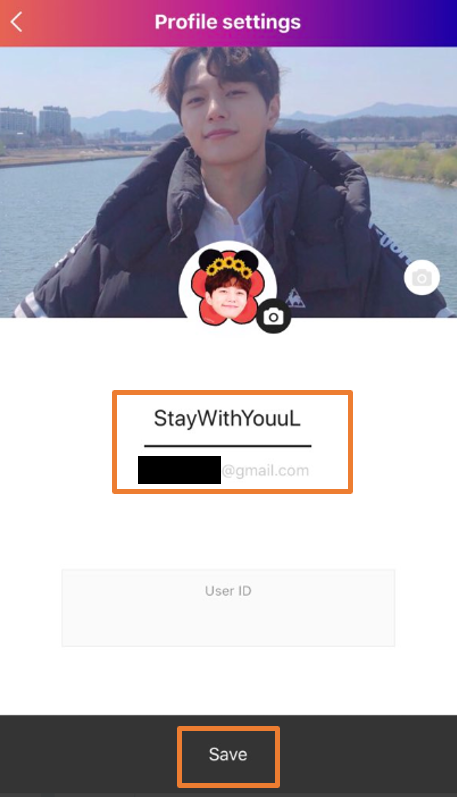
1. Choose your username, profile picture and header
2. Once you are done with (1), click "save"


Step 4: 
1. when you sign up with new accounts
⇨ get free 100 silverstars
⇨ 3 "The Show" votes
"The Show" votes is needed for voting, silverstars need to be converted into "The Show" votes before you can vote*

Step 5:
How to view your point's status, and convert your silverstar into "The Show" votes?

1. Click ≡ then look for "My Points"


2. Goldstar VS Silverstar, are they the same? No.

Extremely important
(!!) Before your Silverstar expired on the 16th of every month, please kindly convert them into "The Show" votes 

3. Silverstar
How to earn (free) Silverstar? (You can go to "STARPASS instructions for more details)

A) Subscription (by creating new accounts)
⇨ 100 Silverstar + 3 The Show votes (one time only)

B) New photo post in "contents"
⇨ 20 Silverstar for each post
⇨ Up to 2 times per day

C) New video post in "contents" via Youtube link
⇨ 20 Silverstar for each post
⇨ 1 times per day

(B) + (C) = can easily obtain 200 silverstar on a daily basis

(image above show you, how you get to find "contents" + upload images/video in order to obtain the Silverstar \(@ ̄∇ ̄@)/ )

D) Go to "My Point" > Silverstar top up 
⇨ gain 10 silverstar by watching ads
⇨ 50 silverstar (= 5 The Show votes) can be gained per hour
⇨ silverstar can be gained by completing mission


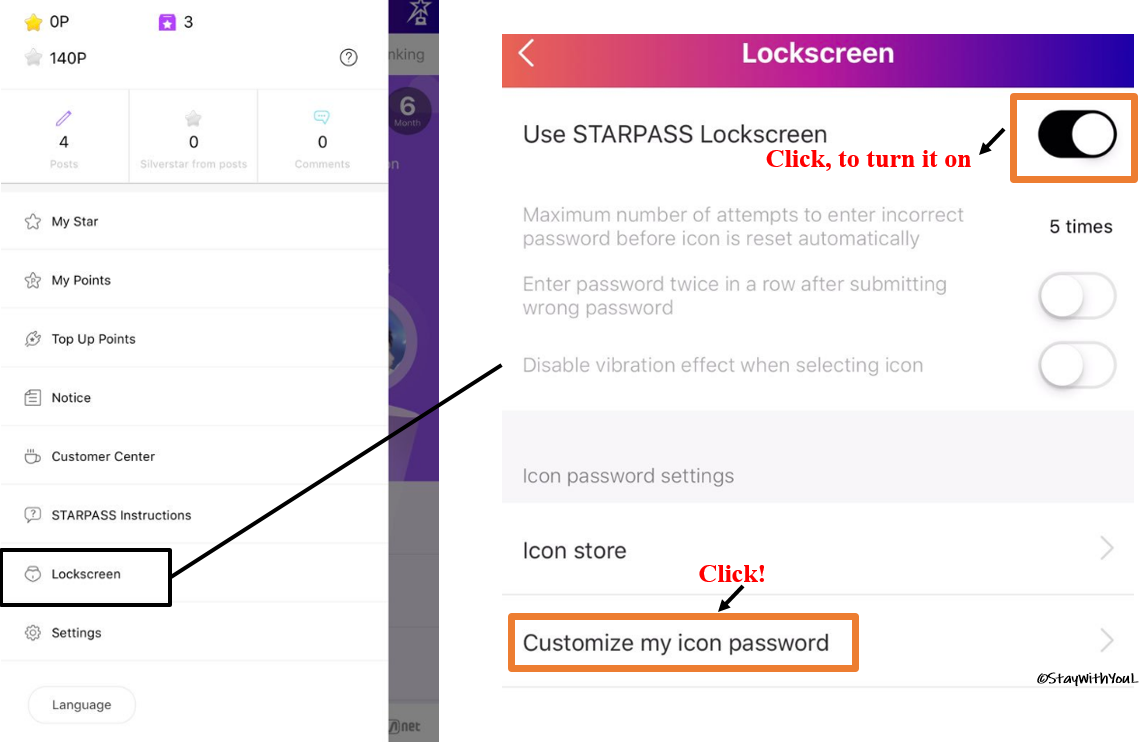
E) Collecting Silverstar with "Lockscreen" (2 silverstars whenever you unlock your STARPASS screen, max 200 silverstars per day)
1. Look for "Lockscreen"
2. Follow the instructions in the image below


3. After clicking onto "Customize my icon password", it will look like this (refer to the image below)
4. Click onto the "+" to add in your own icon password


5. Next, fill up all the slot then click onto "upload" (please refer to the picture below)


6. Once you have uploaded it, the page will ask you to choose 2 pictures out of your 12 pictures.
⇨ Please remember which 2 pictures you picked, as it is needed to unlock your lock screen when you enter STARPASS
⇨ max you can earn 200 silverstars per day


4. The Show Vote
⇨ click "The Show Vote Convert"
⇨ convert all
⇨ 10 Silverstar = 1 The Show Vote

Extremely important (Going to repeat myself again)
(!!) Before your Silverstar expired on the 16th of every month, please kindly convert them into "The Show" votes 


Did you managed to follow all these steps? if you've got any problems with any steps, do look for me on my twitter (@StayWithYouL) I'll try my best to help you. Please don't be shy, as long as you're willing to try, I will try my best to help. :)

We can collect Silverstars as and when we're free! Don't wait till last min~ Accumulating votes slowly would be good. ԅ╏ ˵ ⊚ ◡ ⊚ ˵ ╏┐

Tuesday, 25 June 2019

VPN Tutorial (IOS + Android Users)

Why do we need to use VPN?

  • So that we can access to region-restricted websites
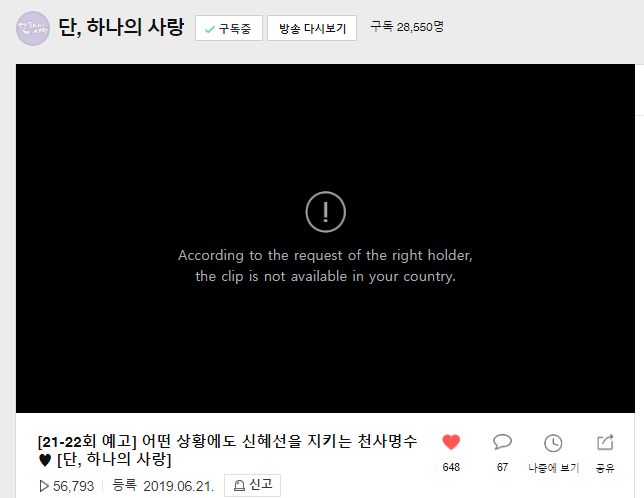
  • Naver TV sometimes block international fans from viewing certain videos (Naver TV helps in social points when it comes to music shows & it's also the "YouTube" in Korea)

For example:


This is when you need to use VPN

Android Users:
download links:


IOS Users (updated on 19/04/2020):
VPN for IOS Users, are a bit different from Android, but no worries! I'll guide you through. :)

Step 1:
Download "OpenVPN connect" & "Totally Free VPN" from your Appstore (these apps are free~ so you don't have to worry about it!)


Step 2:
1. Open your "Totally Free VPN" , it will looks something like this
2. Look for: Korea Republic of


Step 3:
1. Right after you clicked onto "Korea Republic of", "download configuration" will then pop out
2. click onto "Yes"


Step 4:
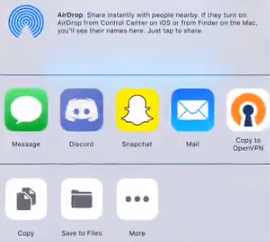
Next, export it to "OpenVPN connect"


Step 5:
1. Click onto "ADD"
2. After "ADD", it will show "Profile successfully imported" (mean you are doing it right! :))


Step 6:
1. Turn on your VPN on the left side
2. Once it is turned on, it will show "connected" :)


How do you check if you have followed the steps correctly or your VPN is working?
2. If you're able to view the videos in that channel, then good job! You've followed well. ^_^b


How to contribute to brand reputation

Hello! Please make sure you read till the end alright. :)

What's brand reputation?

  • A ranking published by the Korean's side, that reflects how much media buzz a group / individual had in the past month (monthly record)
  • In short, the higher rank, the better it is.

One of the way fans can help to contribute brand reputation is through Naver (What's Naver? It's Korea largest search engine, similar to Google)

How to? (alright, follow me! I will show you how can you contribute to brand reputation)

I understand that not everyone has the time to do it all the way to the last step, however just by logging in and click onto the smiley is also good enough. :)

If you're still unclear on which articles you should click on, I will upload Naver's links regarding Myung Soo on my Twitter (https://twitter.com/StayWithYouL), do keep a look out for it.


You can access to Naver through this: https://www.naver.com/
⇨ You can sign in by facebook / LINE (most recommended for international fans to login by either facebook or LINE) Naver account


Did you managed to sign in? If yes, good job! This is only the start, let's keep it going. :)

Do you know, liking and sharing articles on Naver helps to increase brand reputation? It's not difficult, let's go! I will show you. :)

Step 1:
Search 김명수 (kim myung soo) on https://www.naver.com/ Depending on his schedules, if he is active as an actor, then you can also search for his articles by his drama's name in Korean.

Step 2:
Please refer to the image 
1. click onto "뉴스" which will lead you to a list of articles
2. look for "최신순" to sort the articles to the latest one

Step 3:
1. look for "네이버뉴스" (Naver news) & click on it
2. which then lead you to an article (if you saw a smiley face on the left side, mean you're doing it correctly~)


Step 4:
look for the smiley face on the left side of the article, click onto only the first 2 (refer to the image)

Step 5:
1. Scroll down all the way, & look for this (refer to the image)
2. click onto "이 기사를 추천합니다" to recommend article to main page (why? if a lot of us are recommending it, article will appear on Naver's main page which will gain attention from the public)
Are you following well? :) Good job if you've reached this step!

Step 6:
leave pretty or encouraging words for myung soo on the articles in Korean (it's perfectly okay if you don't ~)


Step 7:
1. click onto the thumb up's sign to up vote positive comments (why? by up voting positive comments, it will appear on the top of all the negative ones) 
2. we can up vote as many positive comments as we want (no restriction)

We all want Myung Soo to read pretty and encouraging words, don't we? :)


Yay, you're almost done! ^_^b

Step 8:
Lastly, just share the article out onto your social media, and encourage more fans to click onto the smiley and like the article. :)

P.s. normally, I share out the articles onto twitter ~


You're done, and have contributed to Myung Soo's monthly brand reputation! ^_^